
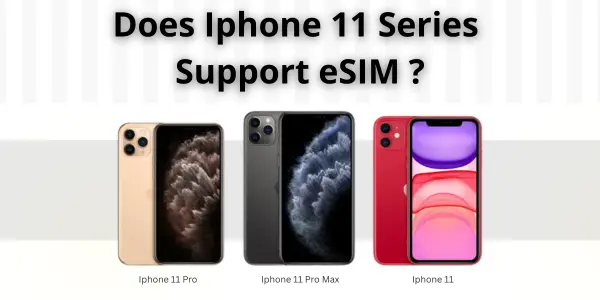
Does iPhone 11 have eSIM, and is it fully compatible? Heres the answer,
Yes, all models in the iPhone 11 series support eSIM, allowing you to use dual SIM, activate travel data plans, and switch networks without needing a physical card.
This guide explains everything you need to know about eSIM on the iPhone 11 lineup, including supported carriers, activation steps, FAQs, and troubleshooting.
Quick Answer: Yes, Every iPhone 11 Model Supports eSIM
Here’s the exact compatibility:
| iPhone Model | eSIM Support | Dual SIM | Notes |
|---|---|---|---|
| iPhone 11 | Yes | eSIM + Nano-SIM | Fully supports global eSIM providers |
| iPhone 11 Pro | Yes | eSIM + Nano-SIM | Same features as base model |
| iPhone 11 Pro Max | Yes | eSIM + Nano-SIM | Works with most travel eSIMs |
The iPhone 11 lineup includes a built-in eSIM, which means:
-
No physical SIM needed to activate a plan
-
Instant activation through QR code or app
-
Perfect for switching carriers or using travel data
What Can You Do With eSIM on iPhone 11?
The iPhone 11 uses eSIM to:
-
Add multiple data plans
-
Switch networks in seconds
-
Use one SIM for work and one for personal use
-
Activate travel data without buying a physical SIM
-
Keep your main number active while using an international plan
So yes , the iPhone 11 does take eSIM, uses eSIM, and supports full dual SIM functionality.
 Is the iPhone 11 Good for Travel eSIMs?
Absolutely.
The iPhone 11 is one of the most widely supported devices by international eSIM providers.
Popular travel eSIM providers that work with the iPhone 11:
-
Airalo
-
Saily
-
Holafly
-
Nomad
-
Jetpac
-
Flexiroam
Why the iPhone 11 is great for travel:
-
Quick activation when you land
-
No roaming charges
-
Keeps your WhatsApp and local number active
-
Works with global 4G LTE networks
How to Check if Your iPhone 11 Supports eSIM
Follow these steps:
-
Open Settings
-
Tap General
-
Tap About
-
Scroll to Digital SIM
If you see:
-
Digital SIM
-
EID number
→ Your iPhone 11 supports eSIM (all models should display this).
How to Activate eSIM on iPhone 11 (3 Easy Ways)
1. QR Code Activation
-
Go to Settings → Cellular → Add eSIM
-
Select Use QR Code
-
Scan the code from your carrier
-
Tap Add Cellular Plan
2. App-Based Activation
Works with Airalo, Nomad, Saily, etc.
-
Install the provider’s app
-
Buy a plan
-
Tap Install eSIM
-
Follow on-screen steps
3. Manual Installation
If your carrier gives you activation details:
-
Go to Settings → Cellular → Add eSIM
-
Select Enter Details Manually
-
Enter SM-DP+ Address + Activation Code
Carriers That Support eSIM on iPhone 11
The iPhone 11 Pro and iPhone 11 Pro Max support the same carriers.
United States
-
AT&T
-
Verizon
-
T-Mobile
-
Mint
-
Visible
United Kingdom
-
EE
-
Vodafone
-
O2
-
Three
Europe & International
-
Orange
-
A1
-
TIM
-
Vodafone
-
Deutsche Telekom
Global eSIM Carriers
-
Airalo
-
Saily
-
Holafly
-
Nomad
If your carrier provides eSIM, the iPhone 11 will support it.
Dual SIM: How It Works on iPhone 11
The iPhone 11 offers Dual SIM capability using:
-
1 nano-SIM
-
1 eSIM
What you can do:
-
Use two numbers at once
-
Assign one SIM for calls and one for data
-
Switch data plans easily
-
Label each SIM (Work, Travel, Personal)
This feature is helpful for:
-
Travelers
-
Business users
-
Digital nomads
-
Students living abroad
Can iPhone 11 Use eSIM Only?
Yes , you can use just the eSIM if you want.
But the iPhone 11 still has a physical SIM slot (unlike US iPhone 14 and newer).
How Many eSIMs Can iPhone 11 Store?
The iPhone 11 can:
-
Store multiple eSIM profiles
-
Use only 1 eSIM at a time alongside the physical SIM
You can switch profiles anytime through Settings.
Troubleshooting: eSIM Not Working on iPhone 11
If your iPhone 11 eSIM isn’t working, try these fixes.
1. eSIM Not Showing or Not Detected
-
Restart your iPhone
-
Update to latest iOS
-
Reset network settings
-
Check if your carrier supports eSIM
2. QR Code Not Scanning
-
Increase screen brightness
-
Ensure WiFi is ON
-
Try manual activation
3. No Service on eSIM
-
Turn Airplane Mode ON → OFF
-
Check APN settings
-
Select network manually
-
Contact provider for reactivation
4. eSIM Deleted After Update
-
Restore using carrier/account
-
Reinstall from app (Airalo, Nomad, Saily)
-
Avoid beta iOS releases
Frequently Asked Questions (People Also Ask)
1. Does iPhone 11 have an eSIM?
Yes, the iPhone 11 has built-in eSIM support.
2. Does iPhone 11 support eSIM and physical SIM at the same time?
Yes, it supports dual SIM (eSIM + nano-SIM).
3. Does iPhone 11 Pro have eSIM?
Yes, the iPhone 11 Pro includes full eSIM compatibility.
4. Does iPhone 11 Pro Max support eSIM?
Yes, the iPhone 11 Pro Max uses eSIM and works with all major carriers.
5. Can iPhone 11 use travel eSIMs?
Yes , travel eSIM providers like Airalo, Holafly, Nomad, Saily, and Jetpac work perfectly.
6. Can iPhone 11 do eSIM activation without QR code?
Yes, you can activate manually by entering SM-DP+ details.
Final Verdict: iPhone 11 Series Is Fully eSIM Ready
Whether you own the iPhone 11, iPhone 11 Pro, or iPhone 11 Pro Max, all models:
-
Support eSIM
-
Support dual SIM
-
Work with global carriers
-
Work with travel eSIM apps
-
Offer fast, easy digital activation
If you were searching for:
-
does iphone 11 have esim
-
does iphone 11 support esim
-
does iphone 11 pro have esim
-
does iphone 11 pro max support esim
- The answer is YES across the entire iPhone 11 lineup.
Related Post:
-
eSIM vs Pocket WiFi vs Local SIM: What’s Best for Travelers? 2026
- Best eSIM for USA Travel: Plans, Coverage & Activation (2026)
- Saily eSIM Review 2026: Honest Traveler’s Experience, Worth Buying or Not?
- Does iPhone xr have eSIM? Essential Benefits and Risks(2026)
-
Vodafone eSIM: Definitive 2026 Guide (Easy Setup, 5G & Hotspot)
- Data Calculator eSIM
