
How many eSIMs can iPhone Use? the short version is:
If you’ve been wondering how many eSIM can be used in iPhone, you’re not alone. Apple has added eSIM support gradually, and different iPhone models support different combinations of physical SIM + eSIM or even dual eSIM.
In this guide, I’ll explain exactly how many eSIMs and SIMs your iPhone can use, with a full model-by-model table, simple explanations, and practical travel tips.
Quick Answer :
On modern iPhones, you need to think about two things:
-
How many SIMs can be active at the same time?
-
How many eSIM profiles can be stored on the phone?
Based on Apple’s documentation and recent eSIM guides: Apple Support.
Maximum active lines on any iPhone:
-
-
Up to 2 lines at once (2 eSIMs, or 1 eSIM + 1 physical SIM, depending on model/region)
-
-
Stored eSIM profiles:
-
Most recent iPhones can store around 8 or more eSIM profiles, but still use only 2 at the same time
-
Model-by-Model iPhone eSIM & SIM Table
Use this table as a quick reference for “how many eSIMs can be used in iPhone” for each family.
Note: Exact storage limits (how many profiles) can vary slightly by model and iOS version, but 8 is a common upper range on modern models.
| iPhone Models | Physical SIM Slots | Active eSIMs at Once | Total Active Lines at Once | Typical Stored eSIM Profiles | Notes |
|---|---|---|---|---|---|
| iPhone X and older | 1 nano-SIM | 0 | 1 (physical only) | 0 | No eSIM support |
| iPhone XR, XS, XS Max, SE (2nd gen) | 1 nano-SIM | 1 | 2 (1 physical + 1 eSIM) | Up to ~5–8 | Early eSIM models; only one eSIM can be active |
| iPhone 11 series | 1 nano-SIM | 1 | 2 (1 physical + 1 eSIM) | Up to ~5–8 | Dual SIM via 1 physical + 1 eSIM |
| iPhone 12 series | 1 nano-SIM (outside some US/eSIM-only variants) | 1–2 (see below) | 2 lines | Up to ~5–8 | Most users: 1 physical + 1 eSIM active; some latest iOS versions support 2 active eSIMs on compatible models |
| iPhone 13 series | 1 nano-SIM (non-US) or eSIM-only in some markets | Up to 2 eSIMs | 2 lines total | Up to 8+ | Supports Dual SIM with two eSIMs, or 1 eSIM + 1 physical SIM |
| iPhone 14 / 15 / 16 / 17 (Intl) | 1 nano-SIM + eSIM | Up to 2 eSIMs | 2 lines total | Up to 8+ | Can use 2 eSIMs or 1 eSIM + 1 physical depending on region |
| iPhone 14 / 15 / 16 / 17 (US models) | No SIM tray (eSIM-only) | Up to 2 eSIMs | 2 lines total | 8+ profiles | eSIM-only: multiple profiles stored, 2 eSIM lines active at once |
| iPhone Air (eSIM-only) | No SIM tray | Up to 2 eSIMs | 2 lines total | 8+ profiles | Ultra-thin eSIM-only model; all lines are digital |
| iPhone SE (3rd gen) | 1 nano-SIM | Up to 2 eSIMs | 2 lines total | Up to ~8 | Supports Dual SIM with two eSIMs like iPhone 13+ |
eSIM Basics: What “How Many eSIMs Can Be Used in iPhone” Really Means
When people search “how many eSIM can be used in iPhone”, they usually mean:
-
How many eSIM lines can I run at the same time?
-
How many different eSIMs can I save for travel or different carriers?
Active vs Stored eSIMs
-
Active eSIMs: lines you’re using right now (calls, SMS, data)
-
Stored eSIMs: profiles saved on your iPhone that you can turn on/off in Settings
Apple’s current guidance: on supported models, you can store eight or more eSIMs and have two lines active at once.
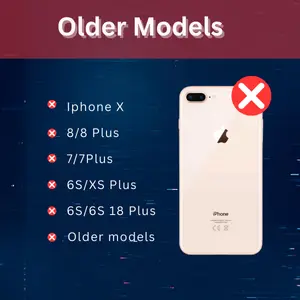 Older Models: iPhone X and Below (No eSIM)
If you still use:
-
iPhone 8 / 8 Plus
-
iPhone 7 / 7 Plus
-
iPhone 6s series
-
iPhone X
Then:
-
You get only 1 physical nano-SIM
-
You do not get eSIM at all
So for these phones, “how many eSIMs can be used in iPhone” = zero.
First-Gen eSIM iPhones: XR, XS, XS Max, SE 2
These were Apple’s first eSIM devices:
-
iPhone XR
-
iPhone XS / XS Max
-
iPhone SE (2nd generation)
They support Dual SIM as:
-
1 physical nano-SIM + 1 eSIM active at the same time
So on these models:
-
Active lines: 2 (1 eSIM + 1 physical)
-
Active eSIMs at the same time: 1
-
Stored eSIM profiles: usually several, but you still use only one eSIM at once
This setup is still great for:
-
Keeping your home number on the physical SIM
-
Using a travel eSIM for cheap data abroad
iPhone 11 & 12: One Active eSIM, One Physical SIM
For iPhone 11 and iPhone 12 families, Apple kept the same idea, but with more polished support:
-
iPhone 11, 11 Pro, 11 Pro Max
-
iPhone 12, 12 mini, 12 Pro, 12 Pro Max
On these:
-
You can run 1 physical SIM + 1 eSIM at the same time
-
You can store multiple eSIM profiles (often 5–8), but still only one eSIM can be active on many 11/12 variants
-
Total active lines = 2
This is where your supporting keyword “how many esims can iPhone 12 have” comes in:
iPhone 12 can usually store several eSIM profiles (around 5–8) but only use one eSIM line at a time, plus one physical SIM.
iPhone 13 Series: Dual eSIM Arrives
With iPhone 13, Apple added proper Dual eSIM support:
Models:
-
iPhone 13 mini
-
iPhone 13
-
iPhone 13 Pro
-
iPhone 13 Pro Max
Key points:
-
You can use two lines at once:
-
2 eSIMs at the same time, or
-
1 eSIM + 1 physical SIM (on models with a SIM tray)
-
-
You can store up to 8 or more eSIM profiles, and switch which ones are active
So on iPhone 13:
-
Active eSIMs: up to 2
-
Total active lines: 2
-
Stored eSIMs: up to 8+
If you travel a lot, you can keep:
-
A home eSIM
-
Several country-specific eSIMs
… and just toggle the right ones when you travel.
iPhone 14, 15, 16, 17 & iPhone Air: eSIM-First (and eSIM-Only in the US)
Apple’s newer lineups push hard towards eSIM-only:
International Models (Most Countries)
For non-US versions of:
-
iPhone 14 / 14 Plus / 14 Pro / 14 Pro Max
-
iPhone 15 / 16 / 17 series
Typically:
-
They still include 1 physical SIM tray + eSIM support
-
They can store ~8 or more eSIM profiles
-
They can have 2 lines active at once (usually 2 eSIMs, or 1 physical + 1 eSIM)
US Models (eSIM-Only)
In the US:
-
iPhone 14 and later ship without a physical SIM tray
-
All lines are eSIM only
-
You can:
-
Store about 8+ eSIM profiles
-
Have 2 eSIM lines active at the same time
-
iPhone Air
The new iPhone Air goes even further:
-
eSIM-only worldwide (no physical SIM tray)
-
Same idea: multiple profiles stored, 2 active eSIMs at once
-
Designed for a fully digital, super-thin experience
How Many eSIMs Can iPhone Use at the Same Time?
Let’s answer the core question directly:
On any current iPhone, you can’t use more than 2 lines at once.
Depending on the model, those 2 active lines can be:
-
1 physical SIM + 1 eSIM (XR, XS, 11, 12, SE 2, etc.)
-
2 eSIMs (13 series and later, SE 3rd gen, US eSIM-only models)
-
Some international models let you choose which combination you want (e.g., 2 eSIMs or 1 eSIM + 1 physical)
How to Check What Your iPhone Supports
If you’re not sure what your phone can do:
-
Find your model name
-
Go to Settings → General → About
-
Check “Model Name” and “Model Number”
-
-
Check SIM options in Settings
-
Go to Settings → Cellular (or Mobile Data)
-
If you see options like “Add eSIM” or “Add Cellular Plan”, you have eSIM support
-
-
Look for the SIM tray
-
If there’s no SIM tray, it’s likely an eSIM-only model (like US iPhone 14+ or iPhone Air)
-
-
Confirm on Apple’s support pages
-
Apple lists which models support eSIM, dual eSIM, and physical SIM combinations. Apple Support
-
Using Multiple eSIMs Smartly (Travel & Work Tips)
Once you know how many eSIM can be used in iPhone, here’s how to use that power:
-
Label your lines clearly
-
In Settings → Cellular, rename lines as “Personal”, “Work”, “Travel EU”, etc.
-
-
Use one line for data, the other for calls/SMS
-
Keep your home number on call/SMS
-
Use a travel eSIM for cheap data
-
-
Store destination eSIMs in advance
-
Install eSIMs before you fly and just switch data line when you land
-
-
Turn lines on/off to save battery
-
Disable lines you don’t use daily
-
FAQs
1. How many eSIMs can iPhone 12 have?
-
Stored profiles: usually up to 5–8 eSIMs, depending on iOS and region Nomad
-
Active at once:
-
Typically 1 eSIM + 1 physical SIM = 2 lines
-
So iPhone 12 is great for:
-
One home number on the physical SIM
-
One travel or work eSIM active at a time
-
Several other eSIMs stored for different trips
2. How many eSIMs can iPhone 13, 14, 15 or 16 have?
On these newer models:
-
Stored: around 8+ eSIM profiles
-
Active: 2 eSIMs at the same time, or 1 eSIM + 1 physical SIM (on models with a tray)
3. Can any iPhone use more than 2 eSIMs at the same time?
No.
-
You can store many profiles, but iPhones are limited to 2 active lines at once (2 eSIMs, or 1 eSIM + 1 physical SIM depending on the model).
4. Do I need an eSIM-only iPhone to enjoy eSIM?
Not at all.
-
Even classic dual-SIM iPhones like XR, XS, 11, 12 work great with:
-
1 physical SIM + 1 eSIM
-
-
eSIM-only phones just remove the plastic card and go 100% digital.
Final Takeaway
When someone asks “how many eSIM can be used in iPhone?”, the practical answer is:
-
Up to two active lines at once on modern iPhones
-
Older eSIM models: 1 eSIM + 1 physical SIM
-
Newer models (13 and later): up to 2 active eSIMs, with 8+ profiles stored
Once you know where your model fits in the table above, you can plan:
-
Which line is for home
-
Which eSIMs are for travel
-
How many profiles you want to keep stored for future trips and carriers.
