
What Is Nomad eSIM?
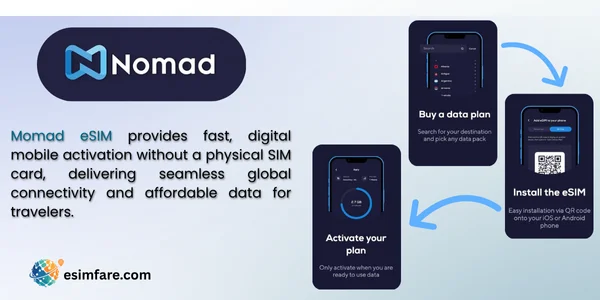
Nomad eSIM is a data plan you activate digitally on compatible phones. You scan a QR code (or install via app), and your phone adds an extra cellular profile for travel data. Your primary SIM stays active for calls/WhatsApp, while Nomad handles affordable data on the go.
Why travelers like it
-
Instant setup, buy and connect in minutes
-
Keep your main number active
-
Usually cheaper than roaming
-
No shipping or pickup counters
Who Is Nomad eSIM Best For?
-
Tourists & business travelers who need reliable data right after landing
-
Digital nomads who want a backup data option across multiple countries
-
Budget-minded travelers comparing roaming vs. local SIMs
-
Short trips & layovers where a physical SIM is overkill
Device Compatibility (Read This First)
Most recent phones support eSIM.
-
iPhone: Settings → General → About → look for Digital SIM or EID
-
Android (Pixel/Samsung): Settings → Connections → SIM Manager → Add eSIM
-
Ensure your phone is carrier-unlocked.
Key Features of Nomad eSIM
-
Wide coverage: regional and country plans for popular destinations
-
Flexible durations: short trips to longer stays
-
App-based install: buy, install, and manage plans in the Nomad app
-
Tethering: typically supported (varies by plan/region; check details at purchase)
-
Top-ups: add data if you run out
-
Support: in-app help and email
Note: Avoid relying on fixed prices because offers change often. Always check plan details before buying.
Quick Facts (At a Glance)
| Item | Summary |
|---|---|
| Setup time | 2–5 minutes (app or QR code) |
| Keep your number | Yes (use your primary SIM for calls/OTP/WhatsApp) |
| Tethering | Usually supported; confirm per plan |
| Ideal trip length | 3–30 days (varies) |
| Best use case | Affordable travel data without store visits |
How to Activate Your Nomad eSIM (Step-by-Step)
-
Check compatibility on your phone (see above) and ensure it’s unlocked.
-
Create an account in the Nomad app or website.
-
Choose a destination plan (country or regional) and the data amount you need.
-
Purchase and install:
-
App install: tap Install eSIM → follow prompts
-
QR code: scan from Settings → Add eSIM
-
-
Turn on data for the Nomad line and set it as “Cellular Data”.
-
Keep your primary line for calls/SMS if needed.
-
Roaming toggle: enable data roaming only for the Nomad eSIM.
-
Test it: open a webpage or maps to confirm it’s live.
Tip: Install the eSIM just before you fly (or on Wi-Fi) so it’s ready to use on landing.
Pros and Cons
Pros
-
Instant digital setup
-
No passport queue or physical stores
-
Often cheaper than roaming
-
Manage everything in one app
Cons
-
Usually data-only (no local number)
-
Coverage/speeds vary by destination
-
Plan rules differ (tethering, fair use, always verify)
Nomad eSIM vs. Roaming vs. Local SIM
| Option | Pros | Cons | Best For |
|---|---|---|---|
| Nomad eSIM | Instant setup, keep your number, flexible plans | Data-only in most cases; plan rules vary | Most travelers who want simple, fast data |
| Carrier Roaming | Keep number, zero setup | Often expensive, bill shock risk | Business trips with expense coverage |
| Local Physical SIM | Can be cheapest, local number | Store visit, ID may be required, time-consuming | Long stays, power users who need a local number |
Nomad vs. Other Travel eSIM Providers
This is a general feature comparison (not pricing). Always check each provider’s current plan page for final details.
| Feature | Nomad | Airalo | Ubigi | Holafly |
|---|---|---|---|---|
| App & web purchase | Yes | Yes | Yes | Yes |
| Data type | Mostly data-only | Mostly data-only | Mostly data-only | Often unlimited (varies) |
| Tethering | Usually allowed (plan-based) | Usually allowed (plan-based) | Usually allowed (plan-based) | Varies by plan |
| Regional bundles | Yes | Yes | Yes | Yes (select regions) |
| eKYC (ID check) | Rare for most destinations | Rare | Rare | Rare |
| Install method | App / QR | App / QR | App / QR | App / QR |
| Top-ups | Yes | Yes | Yes | Varies |
| Support | In-app/email | In-app/email | In-app/email | In-app/email |
How to choose:
-
Pick the provider with the strongest reviews for your destination and a plan that explicitly supports hotspot if you need it.
-
For heavy usage, look for high-data or “unlimited” fair-use plans and read the small print.
How Much Data Do You Need?
-
Maps + chat + email: 1–3 GB/week
-
Social + browsing: 3–5 GB/week
-
Video calls/short videos: 5–10 GB/week
-
Hotspot work sessions: 1–2 GB/hour (depends on workload)
Tip: Start smaller and top up if needed. It’s safer than overbuying.
Troubleshooting (Quick Fixes)
-
No data? Make sure Nomad eSIM is set as Cellular Data and Data Roaming is ON (for the eSIM only).
-
Still not working? Add the APN provided in your plan email/app.
-
Slow speeds? Toggle airplane mode, try 4G/5G switch, or move to a better signal spot.
-
Dual SIM confusion? Turn off data on your primary line to avoid roaming charges.
-
eSIM limit reached? Delete older eSIM profiles you no longer use.
Best Practices for Smooth Travel Data
-
Install on Wi-Fi before departure.
-
Keep your primary SIM active for OTP and calls (data off).
-
Save offline maps for the first hour after landing.
-
Carry a power bank; activation and navigation drain battery.
-
Screenshot your QR code and plan details.
Frequently Asked Questions (FAQ)
1) Does Nomad eSIM give me a phone number?
Most Nomad plans are data-only. Use your primary SIM or apps like WhatsApp for calls.
2) Can I share data via hotspot?
Often yes, but rules vary by destination/plan. Check the plan details during checkout.
3) When should I install the eSIM?
Install on Wi-Fi before your flight or on arrival at the hotel/airport Wi-Fi.
4) Will it work on 5G?
Where supported by local networks and your plan/phone, you may get 4G/5G. Coverage differs by country.
5) Can I top up?
Yes, most Nomad plans support in-app top-ups.
Conclusion
Nomad eSIM is a hassle-free way to get fast, flexible travel data without hunting for a store or paying steep roaming fees. If your phone supports eSIM and you value convenience, Nomad is a strong pick, just confirm tethering rules, duration, and coverage for your destination before you buy. For heavy data users, compare providers for regional bundles and any fair-use limits. With the right plan, you’ll land, connect, and explore, no plastic required.
